



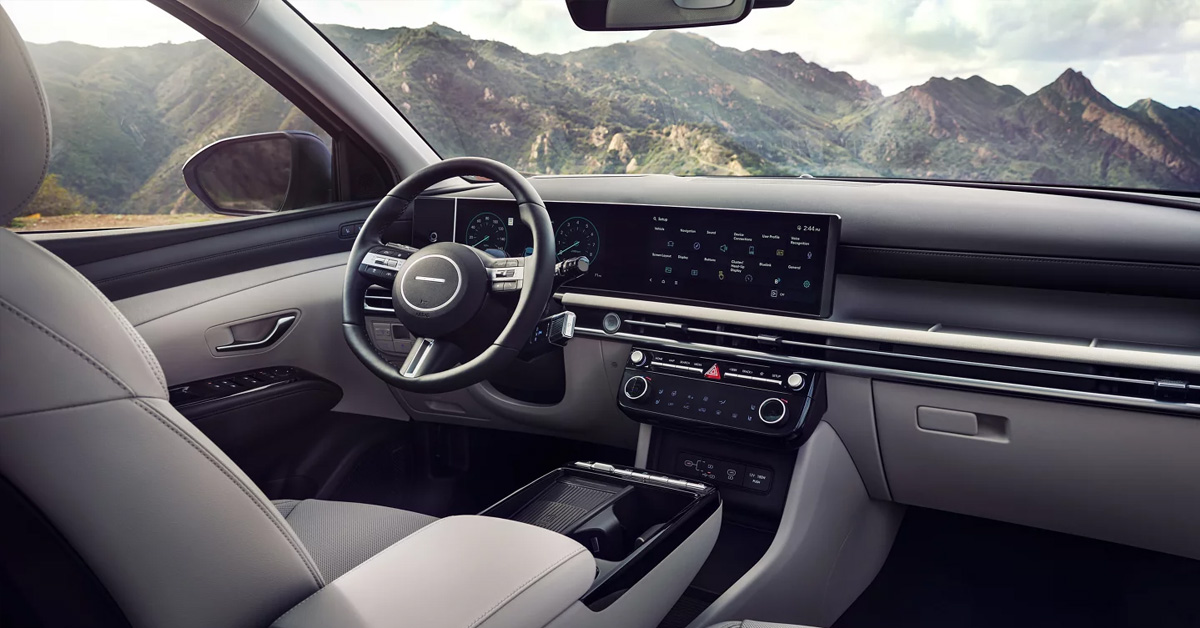
Hyundai Intelligent Speed Limit Assist (ISLA) is an advanced driver assistance technology that uses a front-view camera and navigation data to detect speed limit signs and display them on your instrument cluster. The system actively helps you stay within legal speed limits by providing visual warnings when you exceed the posted limit and can even integrate with your cruise control to automatically adjust your driving speed. Available in popular models like the Hyundai Tucson, Kona, and Santa Fe, this smart safety feature gives drivers greater awareness and control on every journey.
This innovative system offers multiple operating modes to suit your preferences, including Speed Limit Assist mode, Hyundai Speed Limit Warning (SLW), and integration with Manual Speed Limit Assist. Whether you’re commuting through Riverhead, cruising to the Hamptons, or navigating Long Island’s diverse roadways, ISLA works continuously to keep you informed and compliant with changing speed limits.
At Riverhead Hyundai, we’re proud to serve drivers throughout Long Island, Calverton, and the Hamptons with the latest Hyundai safety technologies. Our knowledgeable team is here to help you explore vehicles equipped with Intelligent Speed Limit Assist and answer any questions about how this feature can enhance your daily driving experience. Whether you need sales assistance, expert service, genuine parts, or simply want to test drive a new Hyundai, contact us today or visit our Riverhead dealership.
How Does Hyundai Speed Limit Assist Work?
Hyundai Intelligent Speed Limit Assist (ISLA) uses smart tech to keep you informed about speed limits. The system relies on a front-view camera mounted near your rearview mirror. This camera scans the road ahead and reads speed limit signs as you drive. The data then appears on your instrument cluster in real time.
The system doesn’t work alone. It also pulls data from your vehicle’s navigation system. This dual approach helps ensure you always know the current speed limit. Whether you’re driving a Tucson through Calverton or a Kona to the Hamptons, ISLA stays active and alert.
Hyundai Speed Limit Assist offers three operating modes:
- Speed Limit Assist Mode: The system shows the speed limit and suggests set speed changes for Manual Speed Limit Assist or Smart Cruise Control
- Hyundai Speed Limit Warning (SLW): You receive alerts when you drive faster than the posted limit
- Off Mode: The system turns off completely if you prefer manual control
The Santa Fe and other equipped models display speed limit info right on your instrument cluster. When the camera can’t detect a sign, dashes appear instead. The system also shows extra road signs when relevant, like no passing zones or conditional limits.
Here’s what happens when speed limits change:
Your Hyundai speed limiter technology springs into action. An arrow pointing up or down appears on your display. This tells you the set speed needs to change. You can then use the steering wheel controls to adjust your cruise control with a simple press of the plus or minus button.
The Set Speed Auto Change feature takes things further. When paired with navigation, your Manual Speed Limit Assist can adjust speed on its own. The system works on roads with limits of 70 km/h or higher. Your set speed shows in green when this feature is active. This means less work for you on long drives across Long Island.
What Are the Benefits of Hyundai Speed Limiter Technology?
Hyundai Intelligent Speed Limit Assist brings real safety value to your daily drive. The system helps you avoid costly speeding tickets on Long Island roads. You gain peace of mind knowing the current speed limit at all times. This is key when driving through areas with frequent limit changes.
Key safety benefits include:
- Constant speed awareness: Your Tucson, Kona, or Santa Fe displays the limit right on your dashboard
- Active warnings: Hyundai Speed Limit Warning alerts you when you’re going too fast
- Reduced distractions: No need to watch for every speed sign along the road
- Better focus: You can keep your eyes on traffic instead of searching for signs
The Hyundai speed limiter works hand-in-hand with Smart Cruise Control. This pairing creates a smooth driving experience. When speed limits change, your system suggests the new set speed. You stay legal without constant adjustments. This proves helpful on highways between Riverhead and the Hamptons.
Manual Speed Limit Assist adds another layer of control. The system can adjust your cruise speed as limits change. This happens on its own when using Set Speed Auto Change. Your vehicle slows down or speeds up to match the posted limit. Green text on your cluster shows when this feature is active.
Practical advantages for Long Island drivers:
- Less stress in unfamiliar areas like Calverton
- Fewer speed-related violation
- Smoother transitions between speed zones
- Enhanced safety for you and your passengers
Hyundai Intelligent Speed Limit Assist (ISLA) also helps with fuel efficiency. Steady speeds mean better gas mileage. You avoid sudden braking when you notice you’re speeding. The system promotes calm, consistent driving habits. These benefits add up over time, saving you money at the pump.
How Do You Activate Hyundai Intelligent Speed Limit Assist (ISLA)?
Setting up Hyundai Intelligent Speed Limit Assist is quick and simple. Your Tucson, Kona, or Santa Fe makes the process easy through the infotainment system. You can turn the feature on or off based on your needs. The entire setup takes just a few moments.
Follow these steps to activate the system:
- Turn on your engine
- Select Settings on your touchscreen
- Choose Vehicle from the menu
- Tap Driver Assistance
- Select Speed Limit to view your options
You’ll see three modes to choose from. Speed Limit Assist mode shows speed limits and works with Manual Speed Limit Assist. Hyundai Speed Limit Warning (SLW) alerts you when you’re speeding. The Off setting turns the system off completely. Pick the mode that fits your driving style best.
Additional settings you can adjust:
- Country Selection: Choose your country manually if navigation isn’t available
- Warning Volume: Set how loud you want alerts to sound
- Driving Safety Priority: This lowers other audio when warnings play
The warning volume control lets you pick a level from one to ten. Even if you set it to zero, alerts still play at level one. This ensures you never miss important speed warnings. The system keeps you informed no matter your audio preferences.
Always park your vehicle safely before changing these settings. Never adjust Hyundai Intelligent Speed Limit Assist (ISLA) while driving. Pull over to a safe spot first. This simple rule helps keep you and others safe on Riverhead and Long Island roads.
Your Hyundai speed limiter settings save automatically once you make changes. The system remembers your choices each time you start your vehicle. You won’t need to set things up again unless you want to change modes. This convenience makes the technology easy to use every day in Calverton and beyond.
When Might Hyundai Speed Limit Warning Not Work Properly?
Like all camera-based systems, Hyundai Intelligent Speed Limit Assist has some limits. The front-view camera needs a clear view to read road signs. Weather and road conditions can affect how well the system works. Understanding these limits helps you use the feature safely.
Camera obstruction issues:
- Snow or ice covering the windshield
- Heavy rain blocking the camera’s view
- Dirt or debris on the glass
- Fog reducing visibility
When your camera gets blocked, a warning message appears. Your instrument cluster shows “Driver assistance system limited. Camera obscured.” The system may stop working until the obstruction clears. Simply clean your windshield to restore full function. Your Tucson, Kona, or Santa Fe will alert you when ISLA is limited.
Road sign problems that affect detection:
- Faded or damaged speed limit signs
- Signs covered by tree branches or shadows
- Dirty signs that are hard to read
- Non-standard signs that don’t match typical formats
- Multiple signs placed too close together
Bad weather creates challenges for Hyundai Speed Limit Warning. Rain, snow, and fog make signs harder to see. The system works best in clear conditions. Long Island winters can test the camera’s limits. Keep your windshield clean during harsh weather in Calverton and the Hamptons.
Navigation system issues can also cause problems. Outdated map data leads to incorrect speed information. The GPS signal may contain errors in some areas. New roads that aren’t in your navigation yet won’t have proper data. Regular updates help your Hyundai speed limiter work at its best.
Driving conditions that limit performance:
- Sharp or continuous curves in the road
- Driving through speed bumps
- Steep hills going up, down, or sideways
- Heavy vehicle vibration
- Sudden light changes entering or exiting tunnels
Your Hyundai Intelligent Speed Limit Assist (ISLA) may not work for 15 seconds after starting. The front camera needs time to initialize. This brief delay is normal. The system will activate once the camera is ready.
System malfunction warnings to watch for:
- “Check driver assistance system” message on your display
- Warning lights appearing on the instrument cluster
- The system not detecting any speed limits
If you see these warnings, visit Riverhead Hyundai for service. Our trained techs can inspect your Santa Fe or other model. We’ll make sure your Hyundai Speed Limit Assist works properly. Don’t ignore warning messages, as they indicate the system needs attention.
The Manual Speed Limit Assist feature also has limits. It may not adjust on roads with very low speed limits. Roads under 30 km/h might not trigger automatic changes. Always stay alert and ready to control your speed manually when needed.
Frequently Asked Questions About Hyundai Intelligent Speed Limit Assist
How does Hyundai Intelligent Speed Limit Assist work?
Hyundai Intelligent Speed Limit Assist uses a front-view camera to detect speed limit signs and navigation system data to display the current speed limit on your instrument cluster, warn you when exceeding the limit, and suggest speed adjustments for cruise control.
Which Hyundai models offer Intelligent Speed Limit Assist?
Hyundai Intelligent Speed Limit Assist is available in models including the Tucson, Kona, and Santa Fe, though availability may vary by trim level and model year.
Can I turn off Intelligent Speed Limit Assist in my Hyundai?
Yes, you can turn off Intelligent Speed Limit Assist by going to Settings > Vehicle > Driver Assistance > Speed Limit and selecting the “Off” option from the infotainment system menu.
Is Hyundai Intelligent Speed Limit Assist accurate?
Hyundai Intelligent Speed Limit Assist is generally accurate but may not display correct speed limits when road signs are damaged, obscured, dirty, non-standard, or when navigation data is outdated or contains errors.
Does Intelligent Speed Limit Assist work in all driving conditions?
No, Intelligent Speed Limit Assist may not work properly during heavy rain, snow, or fog, when the camera is blocked, on sharp curves, through tunnels with sudden light changes, or for the first 15 seconds after vehicle startup while the camera initializes.
Experience Hyundai’s Advanced Safety Technology at Riverhead Hyundai
Hyundai Intelligent Speed Limit Assist represents just one of many smart safety features available in today’s Hyundai lineup. The Tucson, Kona, and Santa Fe all offer cutting-edge technology designed to protect you and your passengers. These systems work together to create a safer, more confident driving experience on every trip. Ready to see ISLA in action? Visit Riverhead Hyundai to explore our full selection of equipped vehicles.
Our team serves drivers throughout Long Island, Calverton, and the Hamptons with expert guidance and support. We’ll walk you through every feature and answer all your questions about advanced driver assistance systems. Want to learn more about what makes these models special? Discover the compelling reasons behind the Santa Fe’s popularity or explore the complete specifications and trim available in the Kona. You can also weigh the advantages and considerations of Hyundai ownership to find the perfect fit for your needs
Contact Riverhead Hyundai today to schedule a test drive. Experience Intelligent Speed Limit Assist firsthand and see how it enhances your daily commute. Our sales team is ready to help you find the right Hyundai with the safety features that matter most to you.
Get Directions to Riverhead Hyundai
Disclaimer: All information is provided for general informational and entertainment purposes only. While we strive for accuracy, we cannot guarantee that all content is complete, current, or error-free. Any reliance you place on such information is strictly at your own risk. This article may include opinions and is not endorsed by, or officially affiliated with, any vehicle manufacturer or brand. Always consult official sources – such as the vehicle’s owner’s manual, authorized dealerships, or certified professionals – for the most up-to-date and personalized information.
Connect with us


Riverhead Hyundai
Address
1800 Old Country Road
Riverhead, NY 11901
Phone
- Sales 888-498-5441
- Service 888-493-9931
| Monday | 9:00AM - 8:00PM |
| Tuesday | 9:00AM - 8:00PM |
| Wednesday | 9:00AM - 8:00PM |
| Thursday | 9:00AM - 8:00PM |
| Friday | 9:00AM - 8:00PM |
| Saturday | 9:00AM - 6:00PM |
| Sunday | 11:00AM - 5:00PM |
| Monday | 8:00AM - 4:30PM |
| Tuesday | 8:00AM - 4:30PM |
| Wednesday | 8:00AM - 4:30PM |
| Thursday | 8:00AM - 4:30PM |
| Friday | 8:00AM - 4:30PM |
| Saturday | 8:00AM - 4:30PM |
| Sunday | Closed |
| you break it we fix it | |
| Monday | 8:00AM - 4:30PM |
| Tuesday | 8:00AM - 4:30PM |
| Wednesday | 8:00AM - 4:30PM |
| Thursday | 8:00AM - 4:30PM |
| Friday | 8:00AM - 4:30PM |
| Saturday | 8:00AM - 4:30PM |
| Sunday | Closed |